Two ways to deliver
Photo delivery for photographers
Skerp delivers finished photos on a download link, one press for every photo, or in a download gallery your client looks through, on every plan.

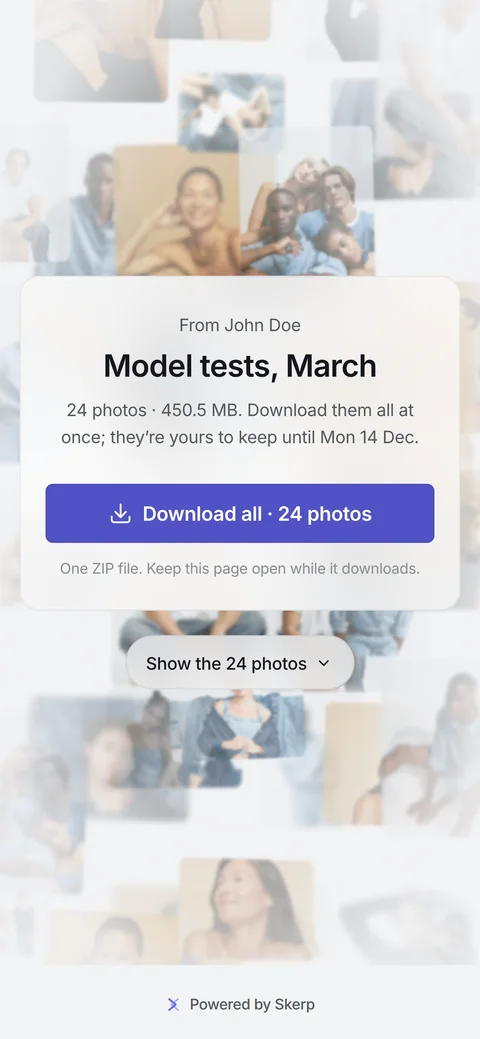
The download link your client opens: their own photos appear behind your name. A still of the real page.
Your client opens it on any device, with no account and no ads; your logo and colour come with Standard.
How delivery works
Pick the way Drop the finals on a new download gallery and send it as a download link or as the gallery. After proofing, Deliver offers both.
Add the finals Retouched files? Replace the proofs by file name, and their approvals stay. For a download gallery of its own, drop the finals on it.
Choose who can open it Add a password. A download gallery can also ask for a name and take a closing date; a download link has its own end date.
Send it Skerp emails the link to your client in your name, or you copy it and send it yourself.
Your client downloads A download link shows their photos as the page opens; one press takes them all. A download gallery lets them take one, some or all.
You know it arrived From a download gallery you get an email when your client downloads. On Standard and up, Insights show what they took.
Does and does not
| What | In Skerp |
|---|---|
| Files | JPG, PNG, WebP and HEIC; no video, no RAW, no PDF or other files |
| What your client downloads | Your original files, as uploaded; no smaller sizes are made for download |
| How they download | One photo, a selection of up to 500, or everything as a ZIP |
| How long the link lasts | Download link: until a date you choose, and you can extend it. Download gallery: as long as you choose. |
| Who can open it | Anyone with the link, or with a name, a name and email, or a password, as you choose |
6 more rows
| What | In Skerp |
|---|---|
| Watermark | On the previews, if you switch it on (Standard and up); never on the downloads |
| Your brand | Your logo and colour from Standard; on Free a small “Powered by Skerp” |
| Ads | None |
| Your client’s account | None needed |
| Storage | Free 3 GB · Standard 50 GB · Pro 500 GB |
| Where the files are kept | In the EU |
Plans, files and data
10 lines: plans, files, data
- What it is
- Photo proofing and delivery for professional photographers
- Who it is for
- Photographers whose clients choose, comment on and approve photos
- Price from
- Free · Standard $15 a month, or $12 a month billed yearly
- Trial
- 14 days of Standard with Albums on every new account, no card
- Your client needs
- A browser on any device, from a computer to a phone; no account, no app
- Files
- JPG, PNG, WebP and HEIC
- Galleries
- Free 3 active galleries · Standard and Pro unlimited
- Storage
- Free 3 GB · Standard 50 GB · Pro 500 GB
- Lightroom
- Skerper for Lightroom Classic, Standard and up; file names on every plan
- Where your data is
- In the EU
Questions
Does the download link expire?
Yes, on the date you set when you make it, and you can extend it. A download gallery stays open for as long as you choose.
Can my client download smaller versions?
No. Every download is the original file you uploaded. For a web size, export one and upload that.
Do I have to proof first?
No. Drop the finals on a new download gallery and send it as a download link or as the gallery. Proofing first is up to you.
4 more questions
Can I watermark a download gallery?
Yes, on Standard and up: the mark sits on the previews in the gallery. What your client downloads is always clean.
Can I deliver on the free plan?
Yes. Free has download links and download galleries with 3 active galleries and 3 GB of storage, with a small “Powered by Skerp” on the page. No card.
Can my client choose first and download after?
Yes. Share a proof gallery; when the selection is in, press Deliver for a download link, or turn the same link into a download gallery.
Which way should I pick?
A download link when they simply want all the photos; a download gallery when they want to choose, or for an event.