Skerp vs WeTransfer
Looking for a WeTransfer alternative for your photos?
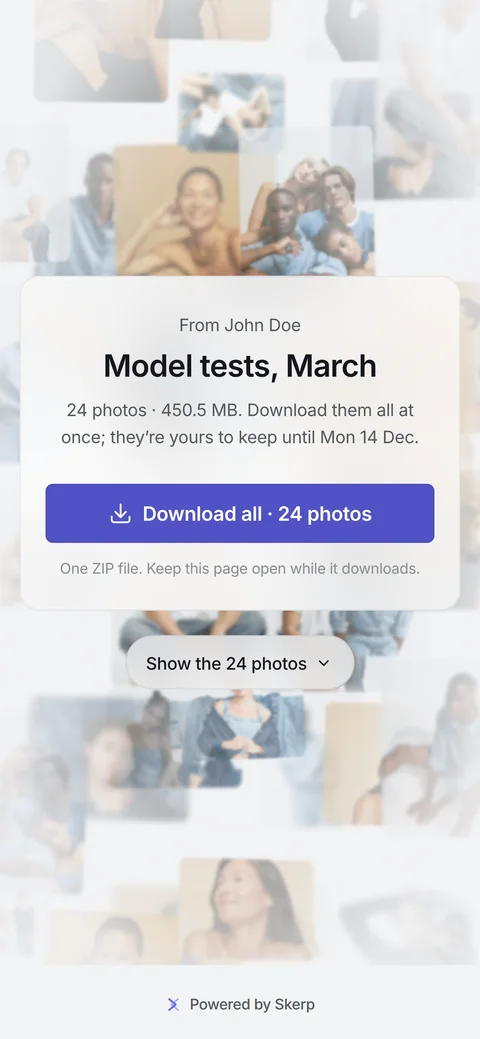
Skerp hands over finished photos on a download link, one press for every photo, or in a download gallery your client looks through first.

Side by side
| What | Skerp download link | Skerp download gallery | WeTransfer Free | WeTransfer paid plans |
|---|---|---|---|---|
| Made for | All the finished photos in one download, with or without proofing first | Finished photos as a gallery to look through and take from | One transfer of files at a time | One transfer of files at a time, with a branded page on Ultimate |
| How long the link lasts | Until a date you set; extend it later | As long as you choose: a closing date, or none | Up to 3 days | Starter: 3 days; Ultimate: a date you choose, or never |
| The page your client sees | A page in your name with their own photos behind it, and one button that downloads them all; your logo from Standard, a small “Powered by Skerp” on Free | A gallery of the photos; your logo and colour from Standard, a small “Powered by Skerp” on Free | A download page with full-page advertising | Ultimate: a branded page with your logo, background and subdomain |
| Choose what to download | Everything at once | One photo, a selection, or everything as a ZIP | Nothing found on their site | Nothing found on their site |
| Use for client work | Every plan, Free included | Every plan, Free included | Free transfers are for non-commercial use only | Yes |
| Let the client choose first | If you like: from a proof gallery, the photos your client approved | Yes: from a proof gallery, on the same link | Nothing found on their site | Nothing found on their site |
All 13 rows
| What | Skerp download link | Skerp download gallery | WeTransfer Free | WeTransfer paid plans |
|---|---|---|---|---|
| Files | JPG, PNG, WebP and HEIC; no video, no RAW | JPG, PNG, WebP and HEIC; no video, no RAW | Nothing found on their site | Nothing found on their site |
| How much you can send | 3 active galleries and 3 GB on Free; 50 GB on Standard, 500 GB on Pro | 3 active galleries and 3 GB on Free; 50 GB on Standard, 500 GB on Pro | 10 transfers or 3 GB in any 30 days | Starter: 10 transfers or 300 GB per 30 days; Ultimate: unlimited transfers |
| Your client needs | No account | No account | No account to download | No account to download |
| To send, you need | A Skerp account | A Skerp account | A WeTransfer account | A WeTransfer account |
| Password | The gallery’s password, if it has one | Every plan | Included | Included |
| Know who downloaded | No download email | An email when your client downloads; Insights on Standard and up | Download tracking included | Download tracking included |
| Where the files are kept | EU only | EU only | Nothing found on their site | Nothing found on their site |
Three reasons
One press, every photo
A download link is one page in your name: their own photos appear as it opens, and one press downloads them all, until a date you choose. A free WeTransfer link lasts up to 3 days, with advertising.
Or a gallery to look through
A download gallery shows the photos large; your client takes one, a selection or all. It stays open for as long as you choose, in your logo and colour from Standard.
Choose first, then deliver
Share a proof gallery and let your client approve; Deliver then makes the download link, or turns the same link into a download gallery. The selection can go into Lightroom on the way (Skerper, Standard and up).
Your client approves, rejects and comments.
Model tests, March






When WeTransfer is the better choice
- Video, RAW and other files Skerp takes JPG, PNG, WebP and HEIC only. For video, RAW files, layered files or documents, use WeTransfer.
- One big one-off transfer Sending a large batch of anything to someone once, with no gallery needed, is what WeTransfer is made for. Skerp’s room is your plan’s storage.
- Nothing to set up WeTransfer is a page, files and an address. Skerp starts from a gallery, which pays off when the photos are the point.
If you move all kinds of files, keep WeTransfer. If what you send is finished photos for a client, try one delivery on Skerp and ask your client which felt better.
How do I move from WeTransfer?
There is nothing to import: WeTransfer links expire on their own. Drop the finals on a new download gallery and send it as a download link: one page, every photo, until a date you choose.
Plans, files and data
7 lines: plans, files, data
- What it is
- Photo proofing and delivery for professional photographers
- Delivery
- Download links and download galleries, on every plan, Free included
- Price from
- Free · Standard $15 a month
- Your client needs
- A browser; no account, no app
- Files
- JPG, PNG, WebP and HEIC
- Storage
- Free 3 GB · Standard 50 GB · Pro 500 GB
- Where your files are
- In the EU
Questions
Can I deliver photos on the free plan?
Yes. Free has download links and download galleries, with 3 active galleries and 3 GB of storage, with a small “Powered by Skerp” on the page. No card.
Does the download link expire?
Yes, on a date you set when you make it: by default your usual closing period, or 30 days. You can extend it. A download gallery stays open for as long as you choose.
Can I send video or RAW files?
No. Skerp takes JPG, PNG, WebP and HEIC. Export RAW files as JPG first, and send video another way.
3 more questions
Does my client need an account?
No. They open the link in any browser, on a phone or a computer, and download. A password is up to you.
Are the downloads watermarked?
No. Your client downloads your original files. A watermark, when you turn one on, sits on the gallery’s previews (Standard and up), never on what they download.
Will I know when my client has downloaded?
From a download gallery, yes: an email when they download, at most one a day, and on Standard and up Insights show what they took. A download link sends no such email.